

Build a Sounding From Your Own Data#
Estimated reading time: 5 minutes
Read a Sounding From an Archive covers the archives tephpy reads. This page covers
the other way in: your data is already in Python, in a
pandas.DataFrame or an xarray.Dataset, and you want a
Sounding out of it.
Both libraries are hard dependencies, so both routes are available in every install with no extra to enable.
From a DataFrame#
Sounding.from_dataframe(...)
reads bare arrays out of the columns. Nothing in a DataFrame carries a unit, so
the units= mapping is required for every field present:
import pandas as pd

from tephpy import Sounding

df = pd.DataFrame(
    {
        "pressure": [1000.0, 925.0, 850.0, 700.0, 607.0,
                     500.0, 400.0, 300.0, 250.0, 200.0],
        "temperature": [15.4, 15.4, 10.4, 4.4, -1.9,
                        -11.9, -22.1, -39.1, -47.9, -55.7],
        "dewpoint": [14.4, 2.4, 3.4, -17.6, -24.9,
                     -37.9, -43.1, -50.1, -57.9, -71.7],
    }
)
units = {"pressure": "hPa", "temperature": "degC", "dewpoint": "degC"}
from_frame = Sounding.from_dataframe(df, units=units)
Ten levels of the Camborne ascent, enough to draw. Column names that already match the field names need no mapping at all.
Naming Your Own Columns#
When they do not match, name them. Each keyword is a field, and its value is the column:
renamed = df.rename(
    columns={"pressure": "p", "temperature": "T", "dewpoint": "Td"}
)
from_renamed = Sounding.from_dataframe(
    renamed, units=units, pressure="p", temperature="T", dewpoint="Td"
)
Note which name units is keyed by. It is the field, not the column, so
the same mapping serves both calls above. pressure and temperature are
required; a missing or mistyped column raises KeyError naming both
names — mistype the renamed frame’s temperature column above as
"Temp" rather than "T", and it raises:
KeyError: "column 'Temp' (field 'temperature') is not in the DataFrame"
Any keyword that names no known field raises TypeError instead,
naming the unknown field and the fields it does know. The catch-all
parameter that absorbs it is called column_map here, var_map on
from_dataset():
TypeError: unknown field(s) ['bogus']; expected ['dewpoint', 'pressure',
'temperature', 'wind_direction', 'wind_speed']
From a Dataset#
Sounding.from_dataset(...)
differs in one way worth knowing, because it is invisible from the signature.
An xarray.Dataset can carry units, in each variable’s
attrs["units"], and the constructor reads them by that convention. Here
units= is the override rather than the requirement, and a CF-compliant
dataset needs none:
import xarray as xr

ds = xr.Dataset(
    {
        "temperature": (
            "level", df["temperature"].to_numpy(), {"units": "degC"}
        ),
        "dewpoint": (
            "level", df["dewpoint"].to_numpy(), {"units": "degC"}
        ),
    },
    coords={
        "level": ("level", df["pressure"].to_numpy(), {"units": "hPa"})
    },
)
from_dataset = Sounding.from_dataset(ds, pressure="level")
Coordinates count as variables, which is why pressure="level" reaches one.
A missing required or explicitly mapped variable raises KeyError,
just as a missing column does for
from_dataframe():
KeyError: "variable 'temperature' (field 'temperature') not in the Dataset"
A field with neither attrs["units"] nor a units= entry raises
TephpyUnitsError — one of
tephpy.exceptions — and the message carries the fix:
'temperature' (variable 'temperature') has no attrs['units'] and no
override: add units={"temperature": "<unit>"}
Naming the Ascent#
Both constructors take station=, time= and label=. Give the first
two and the legend label derives, exactly as it does for a
sounding read from an archive:
named = Sounding.from_dataframe(
    df,
    units=units,
    station="03808",
    time=pd.Timestamp("2026-07-21 12:00"),
)
time here is stricter than the readers of Read a Sounding From an Archive, which
parse a string. This one wants a real timestamp —
pandas.Timestamp, numpy.datetime64 or
datetime.datetime — and a string raises TypeError. label=
overrides the derived text outright.
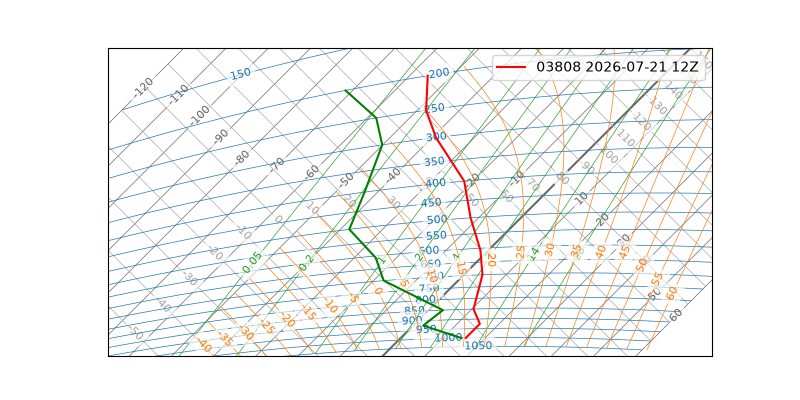
Plotted Like Any Other#
What comes out is a Sounding, and nothing
downstream can tell it was built rather than read:
import matplotlib.pyplot as plt

fig, ax = plt.subplots(subplot_kw={"projection": "tephigram"})
ax.plot_sounding(named)
ax.legend()
Where to Go Next#
Work With Units covers what those unit strings may say, and what you get back. Read a Sounding From an Archive is the other route in, for data still in a file.