

Decode BUFR With ecCodes#
Estimated reading time: 5 minutes
tephpy does not decode TEMP (TTAA/TTBB) bulletins or BUFR messages, and it
is not going to. The formats are WMO’s, the reference decoder for BUFR is
ecCodes, and a second
implementation would be a worse copy of a maintained one. Whether demand later
justifies a tephpy[bufr] extra is #82.
That leaves a seam rather than a gap, and this page is the seam. ecCodes turns a
BUFR message into numbers; tephpy turns numbers into a tephigram. A
TEMP bulletin is a different problem, and gets its own section below.
Decode the Message#
ecCodes ships command-line tools, and they are the shortest route in. bufr_dump
prints a message as one key=value line per key:
$ bufr_dump -p sounding.bufr
A radiosonde message carries the levels as pressure,
airTemperature and
dewpointTemperature, with windSpeed and windDirection beside them;
blockNumber and stationNumber identify the station, and year through
minute give the launch time. A value the message does not carry prints as the
literal MISSING, which matters below.
Install ecCodes however you install anything — it is on conda-forge as
eccodes, and ECMWF publish source and packages. It is not installed by
tephpy and does not need to be: nothing on the rest of this page imports it.
If You Have a TEMP Bulletin#
bufr_dump will not read one. ecCodes decodes BUFR and GRIB, the binary WMO
formats, and a TTAA/TTBB bulletin is neither — it is traditional alphanumeric
code, and nothing above applies to it as it stands.
Nor is there a converter to send you to. WMO’s synop2bufr encodes FM-12 SYNOP rather than TEMP, and re-encoding is discouraged where it is done at all: a converted bulletin still lacks what a native message carries, the radiosonde type and the balloon’s drift among it, and cannot recover precision the code form never had.
What works is not converting. The bulletin and the message carry the same
ascent, and WMO’s migration away from the traditional code forms means most
sources can issue the BUFR, so ask yours for that rather than for the bulletin.
For a station and a time, wyoming.fetch
returns a Sounding from the University of
Wyoming archive and skips this page entirely. And if you do decode the bulletin,
by whatever your centre uses, the rest of this page is unchanged: what follows
takes numbers and does not care what produced them.
Build a Sounding#
What comes out is arrays. What tephpy wants is a
Sounding, which takes bare sequences plus a
units= mapping saying what they are in:
import tephpy

pressure = [1000.0, 925.0, 850.0, 700.0, 500.0, 400.0, 300.0, 250.0, 200.0]
temperature = [22.4, 18.1, 13.6, 4.2, -12.5, -24.1, -39.8, -49.6, -56.2]
dewpoint = [19.8, 16.4, 11.1, -2.9, -21.0, -34.7, -51.2, -60.1, -66.4]

sounding = tephpy.Sounding(
    pressure=pressure,
    temperature=temperature,
    dewpoint=dewpoint,
    units={"pressure": "hPa", "temperature": "degC", "dewpoint": "degC"},
    station="72357",
)
Pressure and temperature are required and everything else is optional, so a
message that carried no humidity still gives a usable sounding — drop
the
dewpoint argument and its units entry together.
Two things the decoder will hand you that need a moment. A radiosonde message
carries pressure in pascals and both temperatures in kelvin — the BUFR
descriptors are defined that way, and bufr_dump prints them unconverted.
Say so in units= rather than converting by hand, because a conversion
written twice is a conversion that disagrees with itself once. And a BUFR
sounding routinely carries missing values at some levels — the MISSING
above. Pass those through as float("nan") and tephpy treats them as
gaps, which is what they are. Pressure is the exception: it must be finite and
monotonic, so drop a level whose pressure is missing rather than passing a NaN.
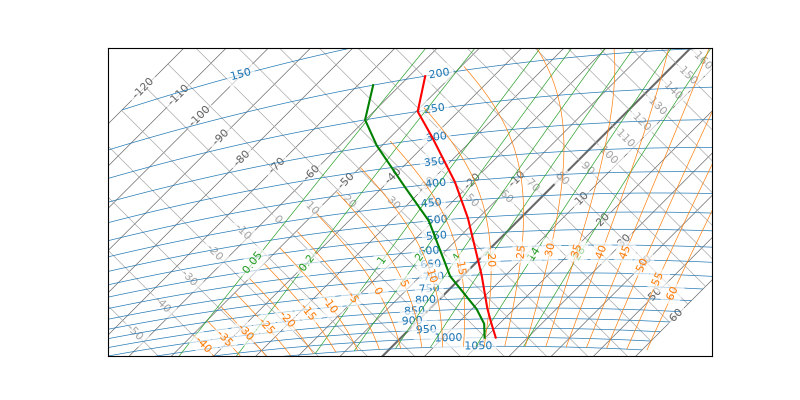
Draw It#
From here it is an ordinary tephigram:
import matplotlib.pyplot as plt

fig, ax = plt.subplots(subplot_kw={"projection": "tephigram"})
ax.plot_sounding(sounding)
Where to Go Next#
Reading an archive rather than a single message is what tephpy.io is for,
and the gallery shows what the package draws once a
sounding is in hand.